Operations and monitoring
Check SQL Accounting and AutoCount tunnel status and test API calls from the portal
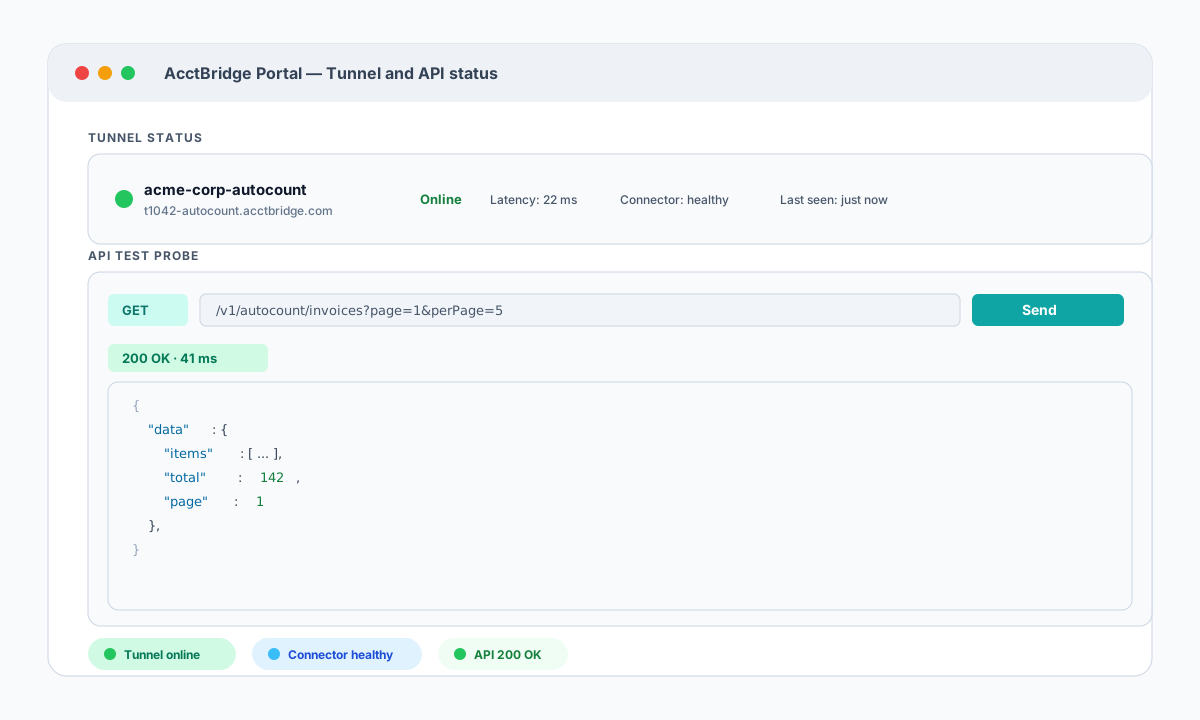
The AcctBridge portal shows live tunnel and connector status for each accounting connection and includes a built-in API test probe so developers can verify endpoints before writing integration code.
Why this matters
After installation, accounting integrations often become a black box: you send a request and hope the connector is alive.
AcctBridge surfaces tunnel and connector status in real time, and includes an API test probe so developers can verify endpoint responses directly from the portal.
Tunnel status tells you what the accounting connection is doing right now
Each accounting connection in AcctBridge has a live tunnel status view. The portal shows whether the outbound tunnel is connected, what the current latency is, whether the local connector service is healthy, and when the connection was last seen.
This matters most when something stops working. Instead of asking whether the accounting machine is online, the portal gives a direct answer — and distinguishes a network drop from a connector process failure.
- Per-connection tunnel status with latency and last-seen timestamp.
- Connector health status separate from tunnel connectivity.
- Clear offline state when the accounting machine is unreachable.
Test API calls before writing integration code
The AcctBridge portal includes an API test probe. Developers can select an accounting connection, choose an endpoint, set query parameters, and fire a live request — all from the browser.
The response body, status code, and latency appear immediately. This lets developers confirm that the connector is returning the expected data shape and that the accounting software is responding correctly before writing a single line of integration code.
- Select any supported endpoint for the connected accounting brand.
- Set query parameters such as docNo, debtorCode, dateFrom, and perPage directly in the probe.
- Response body, HTTP status, and latency are shown inline.
Operations visibility reduces support handoffs
Accounting integrations often fail at the infrastructure layer rather than the business logic layer. A connector that went offline, a tunnel that dropped, or an accounting software that stopped responding does not produce a useful error in the calling system.
AcctBridge keeps these signals in the portal so the first question in any support conversation — "is the connection actually alive?" — has a clear answer without requiring log access or a remote session on the accounting machine.