Installation workflow
A simpler SQL Accounting connector installation flow
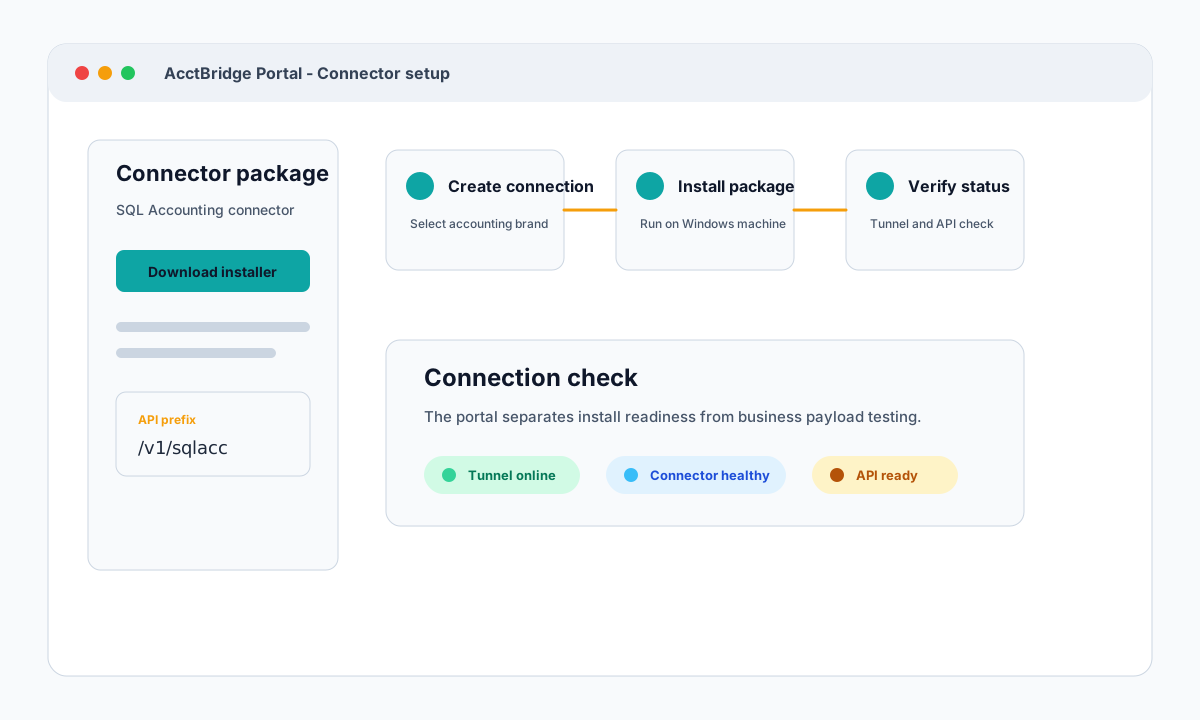
See how AcctBridge keeps SQL Accounting connector setup clear: create an accounting connection, download the installer, run the Windows package, then verify tunnel and API access.
Why this matters
AcctBridge is designed so a company, internal team, or implementation partner does not rebuild the local access layer for every accounting site.
The setup path starts in the portal, continues with a Windows connector package, then ends with visible tunnel, connector, and API checks.
Start from an accounting connection instead of a blank machine
A typical accounting integration starts with scattered setup work: local credentials, a reachable machine, service startup, tunnel access, API keys, and a way to prove the connector is alive.
AcctBridge turns that into a repeatable portal workflow. The accounting brand, API prefix, installer package, tunnel identity, and diagnostics all sit behind the accounting connection boundary.
- Create an accounting connection for the SQL Accounting or AutoCount instance.
- Select SQL Accounting or AutoCount before downloading the connector package.
- Use the portal to keep installer, API key, and connection state in one place.
Installer and connection checks are part of the same flow
The installation story is deliberately operational: install the local connector on the Windows machine where the accounting software runs, then confirm that the gateway can see the connector before the first integration call.
This helps implementation teams separate installation problems from API payload problems. If the connection check fails, support starts from tunnel and connector evidence instead of guessing from a failed business request.
- Windows local connector runs beside the accounting software.
- Outbound tunnel avoids router and firewall reconfiguration in most sites.
- Portal checks expose whether the connection is ready for API traffic.
The result is a repeatable handoff
After the connection check passes, developers can move to documented REST endpoints and API keys. The same setup pattern works for the next branch, company, or customer instead of becoming another one-off remote access project.